

Phishing is no longer easy to spot. The clumsy, typo-filled emails of the past have given way to messages that look polished, personal, and convincing. Attackers now know your company name, your coworkers' names, and the tools you use every day. They use that detail to make a fake message feel real....
Stay One Step Ahead: The Scammer Tactics Every Office User Should Know
Information Technologies | David Steele | Thursday, July 9, 2026
Overview
Could you spot a scam that looks polished, personal, and completely convincing? With over 92 million Americans falling victim to cybercrime in 2022, today's scammers use tactics like phishing, smishing, AI voice cloning, fake tech support, and business email compromise to earn your trust—so staying alert and verifying any suspicious request through a trusted channel can go a long way toward protecting you and your team.

Scammers are getting smarter. Gone are the days of obvious, typo-filled emails—today's scams are polished, convincing, and eerily targeted. In fact, over 92 million Americans were victims of cybercrime in 2022 alone (source: Comparitech), and scammers often use detailed personal information to make their schemes more believable. They might reference your bank name, customer service numbers, or even recent activity to gain your trust. Don’t assume it's legitimate just because it seems specific—always confirm by contacting the company directly.
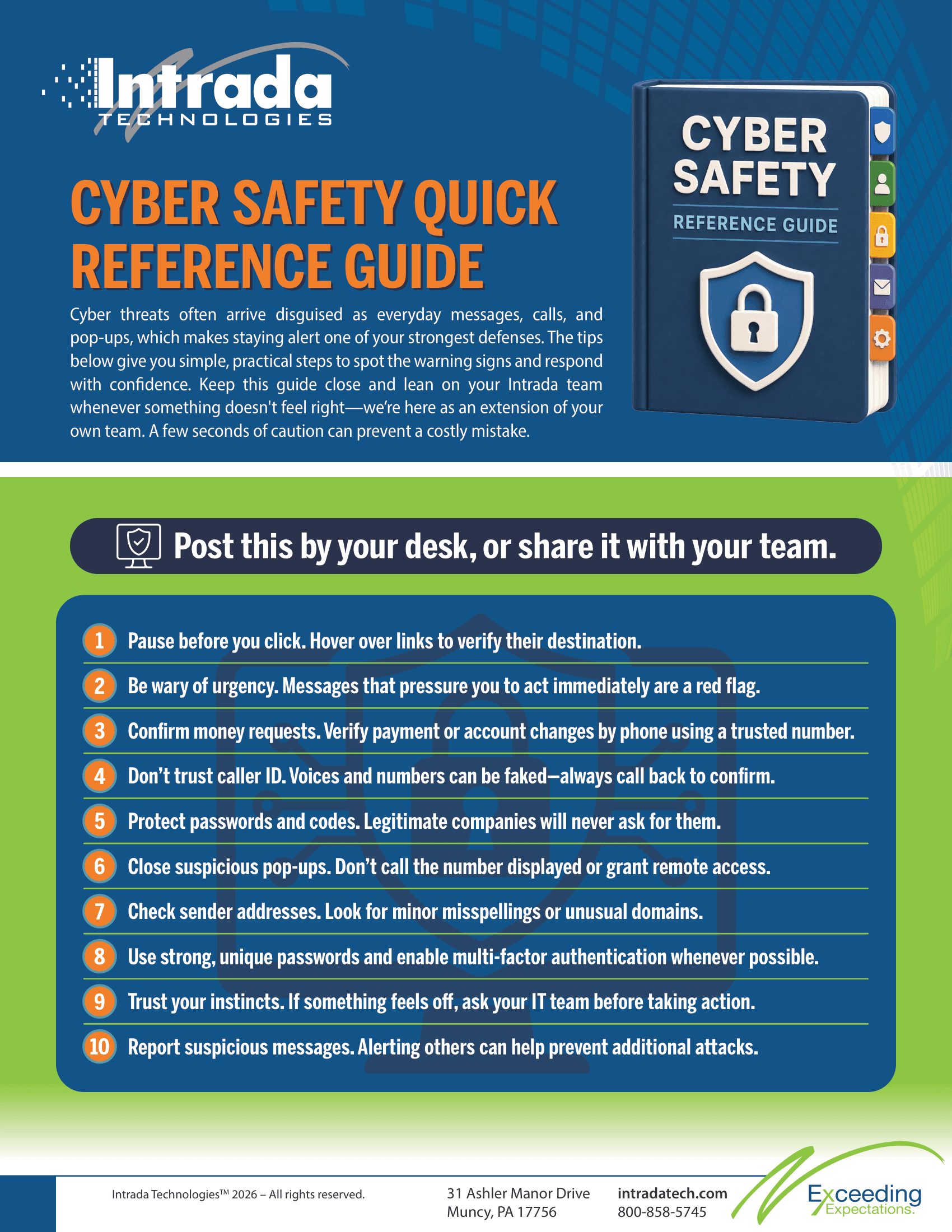
The good news? A little awareness can go a long way. Once you know what to look for, most scams lose their power under closer inspection. In this article, we’ll highlight the most common tactics scammers are using right now and share a quick reference checklist to help protect you and your team.
Phishing Emails: Still the Favorite Trick

Phishing scams are when someone pretends to be a trusted person or company—such as your bank, a vendor, or a coworker—to trick you into clicking a malicious link, sharing a password, or opening an infected attachment. These emails are often designed to look nearly perfect, with real logos and professional language, and they create a sense of urgency to make you act quickly.
Be cautious with emails that ask you to "act now," verify your account, or click on links that seem slightly off. Always hover over links to check their destination and, when in doubt, go directly to the company’s website through your browser instead of clicking.
Smishing: Scams That Land in Your Text Messages
Smishing, or SMS phishing, delivers scams via text messages. You might get a text about a missed package, a suspicious bank charge, or a toll fee—complete with a link urging you to act immediately. These messages often include fake but convincing details, like the name of a courier service or a familiar bank number.
Remember, legitimate companies rarely resolve urgent issues through random links sent via text. When in doubt, contact the company using their official app or phone number instead of tapping the link.
AI
Voice and Deepfake Scams: When Familiar Isn't Real
With new
If a call or video feels suspicious—especially if it involves money or sensitive information—always verify through another trusted channel, such as calling the person directly on a number you know is legitimate.
Fake Tech Support: Help That Hurts
This scam involves pop-ups, emails, or even calls claiming your computer is infected and urging you to contact "support" immediately. Scammers may pretend to represent well-known companies to gain your trust.
Real tech companies don’t cold-call or ambush you with urgent warnings. If you encounter a pop-up or email like this, close it and contact a trusted IT professional or the company directly using their official contact information.
Business Email Compromise (BEC): The Costliest Scam
BEC scams target businesses, either by hacking or impersonating email accounts of managers, owners, or vendors. Scammers use these accounts to send believable requests, such as paying invoices, changing banking details, or buying gift cards.
Always confirm payment requests or banking changes through a second channel, like a phone call. Don’t rely solely on email, even if the message looks legitimate. One quick confirmation can prevent a significant loss.
Cyber Safety Quick Reference
A Final Word
Staying safe online isn’t about fear—it’s about practicing good habits daily. Scammers are constantly evolving their tactics, but with awareness and skepticism, you can stay ahead. Never assume legitimacy based on how detailed or personal a message seems. When in doubt, confirm by reaching out directly using verified contact information.
At Intrada Technologies, we help teams stay informed and protected. If you’d like support with training, reviewing your defenses, or building a response plan, we’re here to help. Reach out to us anytime.

ABOUT THE AUTHOR
David Steele is the co-founder of Intrada Technologies, a full-service web development and network management company launched in 2000. David is responsible for developing and managing client and vendor relationships with a focus on delivering quality service. In addition, he provides project management oversight on all security, compliancy, strategy, development and network services.
Learn MoreSearch is changing under our feet. When someone looks for a service today, they may never see a list of blue links. Instead, they get a single AI-generated answer pulled together from across the web. Google calls these AI Overviews. Tools like ChatGPT, Copilot, and Perplexity do something similar—th...